 oasis-b
LW_MainMenu
Build your own main menu: your commands in your order, two layouts, faces, walking sprites, battlers or portraits, an info box and a background picture.
Needs LW_Core (LWZ_Core in MZ) above all Living World plugins in the Plugin Manager. It's included in every pack.
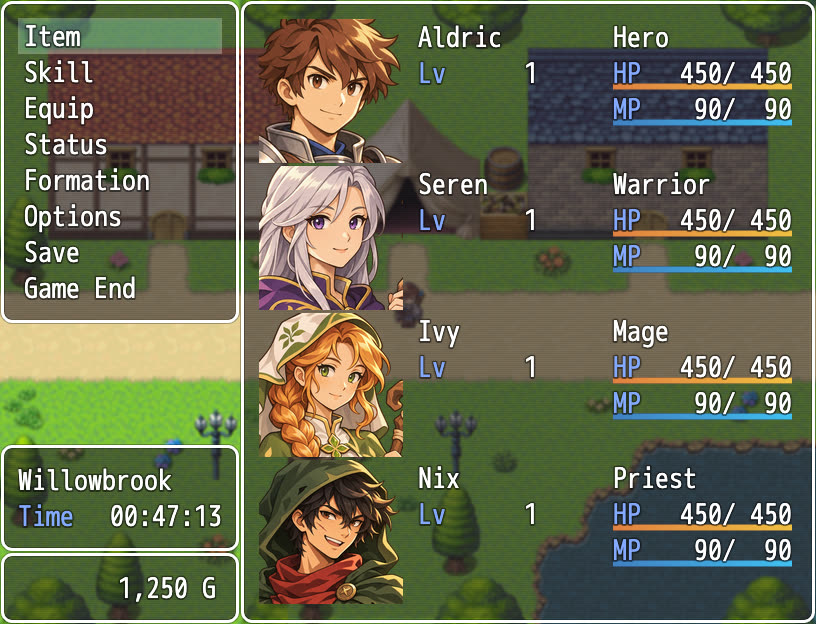
A main menu that looks like your game.
Highlights
- Your commands in your order, with icons, shown or enabled by switch
- Commands that start a common event, open a scene or run a script
- A side layout or a top bar with the party as tall cards
- Faces, walking sprites, battlers or portraits, an info box and a background picture
Ideas for your game
- A "Journal" command that opens your own common event
- A party screen with big portraits
Works well with
Introduction
Requires LW_Core.
The main menu of a new project looks the same in every game. This plugin keeps everything that works (formation, the item, skill, equip and status screens) and lets you change what the player sees first:
- which commands, in which order, with icons, shown and enabled by
  switch or by a line of script
- commands that start a common event, open any scene or run a script,
  also on a chosen party member
- Side layout like a new project, or Top layout with a command bar and
  the party as tall cards
- faces, walking sprites, side view battlers or big portraits
- an info box with location, playtime, steps, saves or variables
- a background picture
Command Actions
Each command has a Name, an Action and optional switches and scripts.
item  skill  equip  status  formation  options  save  gameEnd
                      the standard screens. Empty Name = database name
common event 12       closes the menu and runs common event 12
scene Scene_Name      opens a scene from another plugin
script code           runs a line of script, the menu stays open
actor script code     first pick a party member, then the code runs
                      with "actor" set to that member
actor common event 12 pick a member, store the actor ID in the
                      variable named in the command, run event 12
Commands written for other main menu plugins can be moved over by hand: the actions are named after what MV calls them. Plugins that add their own menu commands keep working when they sit below LW_MainMenu in the plugin list.
Notetags
Actor note:
<LW Menu Portrait: Hero_Bust>      img/pictures, used by Portrait
<LW Menu Portrait Offset: 0, -20>  move the portrait in its card
Script Calls
LW.mainMenu.commands() the command list as the menu sees it
Terms of Use
See TERMS_OF_USE.txt in the download. Short version: use it in as many of your own games as you like, free or commercial. Edit it for your game, but keep this header. Don't share or resell the plugin files on their own. Name oasis-b in the credits of your game.
Changelog
Version 1.0.0 - 2026-11-21 - First release.
Introduction
Requires LWZ_Core.
The main menu of a new project looks the same in every game. This plugin keeps everything that works (formation, the item, skill, equip and status screens) and lets you change what the player sees first:
- which commands, in which order, with icons, shown and enabled by
  switch or by a line of script
- commands that start a common event, open any scene or run a script,
  also on a chosen party member
- Side layout like a new project, or Top layout with a command bar and
  the party as tall cards
- faces, walking sprites, side view battlers or big portraits
- an info box with location, playtime, steps, saves or variables
- a background picture
Command Actions
Each command has a Name, an Action and optional switches and scripts.
item  skill  equip  status  formation  options  save  gameEnd
                      the standard screens. Empty Name = database name
common event 12       closes the menu and runs common event 12
scene Scene_Name      opens a scene from another plugin
script code           runs a line of script, the menu stays open
actor script code     first pick a party member, then the code runs
                      with "actor" set to that member
actor common event 12 pick a member, store the actor ID in the
                      variable named in the command, run event 12
Commands written for other main menu plugins can be moved over by hand: the actions are named after what the engine calls them. Plugins that add their own menu commands keep working when they sit below LWZ_MainMenu in the plugin list.
Notetags
Actor note:
<LW Menu Portrait: Hero_Bust>      img/pictures, used by Portrait
<LW Menu Portrait Offset: 0, -20>  move the portrait in its card
Script Calls
LW.mainMenu.commands() the command list as the menu sees it
Terms of Use
See TERMS_OF_USE.txt in the download. Short version: use it in as many of your own games as you like, free or commercial. Edit it for your game, but keep this header. Don't share or resell the plugin files on their own. Name oasis-b in the credits of your game.
Changelog
Version 1.0.0 - First release for MZ.
Get it
LW_MainMenu is in these packs. Every pack comes as an MV and an MZ download at the same price and needs no other plugin collection. Tested in RPG Maker MV 1.6.2 and MZ 1.10.0 games on Windows, macOS and Linux and in current browsers.