 oasis-b
LW_SeasonTileset
A map swaps its tileset depending on a variable, for example a snowy copy in winter.
Needs LW_Core (LWZ_Core in MZ) above all Living World plugins in the Plugin Manager. It's included in every pack.
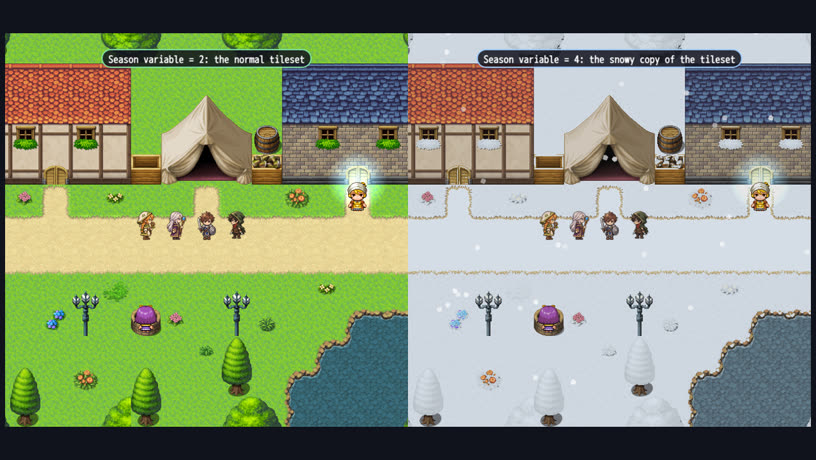
Draw a map once, show it in every season.
Highlights
- A map swaps to a copy of its tileset depending on a variable, for example a snowy copy in winter
- Any number of seasons or states per map: summer, autumn, winter, a burnt village after the attack
- Swaps when the player enters the map and after loading a save, so it is always right
- Passability and terrain stay the same, you only paint the tiles once more
Ideas for your game
- The same village in summer and under snow
- A forest that turns red in autumn
- A town before and after a story event
Works well with
Introduction
Requires LW_Core.
Draw your map once, make a copy of its tileset with snow (or autumn leaves, or night windows) and let the variable decide which one is used. The copy needs the same tile layout, otherwise passability and pictures won't match.
The swap happens when the player enters the map and when a save is loaded. Use the plugin command if the variable changes while the player stands on the map.
Map Notetags
<LW Season Tileset: 4=14>          tileset 14 while the variable is 4
<LW Season Tileset: 3=12, 4=14>    several values
Plugin Command
LW_SeasonTileset refresh picks the tileset of this map again
Terms of Use
See TERMS_OF_USE.txt in the download. Short version: use it in as many of your own games as you like, free or commercial. Edit it for your game, but keep this header. Don't share or resell the plugin files on their own. Name oasis-b in the credits of your game.
Changelog
Version 1.0.0 - 2026-11-21 - First release.
Plugin commands in MZ
In MZ these come as Plugin Command in the event editor, with fields to fill in. Old MV text commands from copied events keep working.
Refresh Tileset
Changes the tileset of this map right away after the variable changed.
Introduction
Requires LWZ_Core.
Draw your map once, make a copy of its tileset with snow (or autumn leaves, or night windows) and let the variable decide which one is used. The copy needs the same tile layout, otherwise passability and pictures won't match.
The swap happens when the player enters the map and when a save is loaded. Use the plugin command if the variable changes while the player stands on the map.
Map Notetags
<LW Season Tileset: 4=14>          tileset 14 while the variable is 4
<LW Season Tileset: 3=12, 4=14>    several values
Plugin Command
Refresh Tileset picks the tileset of this map again
Terms of Use
See TERMS_OF_USE.txt in the download. Short version: use it in as many of your own games as you like, free or commercial. Edit it for your game, but keep this header. Don't share or resell the plugin files on their own. Name oasis-b in the credits of your game.
Changelog
Version 1.0.0 - First release for MZ.
Get it
LW_SeasonTileset is in these packs. Every pack comes as an MV and an MZ download at the same price and needs no other plugin collection. Tested in RPG Maker MV 1.6.2 and MZ 1.10.0 games on Windows, macOS and Linux and in current browsers.