 oasis-b
LW_Storage
A storage box for everything that doesn't fit in the bag. Bag on the left, storage on the right.
Needs LW_Core (LWZ_Core in MZ) above all Living World plugins in the Plugin Manager. It's included in every pack.
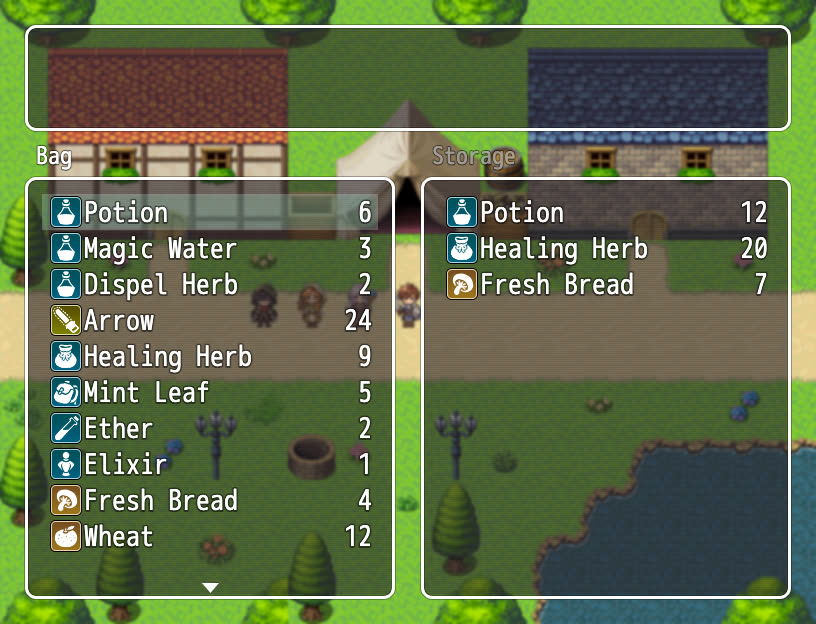
A home for everything that doesn't fit in the bag.
Highlights
- Bag on the left, storage on the right, move one or the whole stack
- The bag keeps its limit, the storage has none
- Several storages with their own names, one per house
- Key items and equipped gear stay out
Ideas for your game
- A chest at the party's home
- A bank vault in the city
- A cellar for collected herbs
Works well with
Introduction
A two-column storage screen, for example in the party's home. The bag keeps its normal item limit, the storage has none. Items, weapons and armor can be stored. Key items, equipped gear and entries whose name starts with "-" (handy for database separators) are left out.
Controls:
Cross / Enter        move one
Square / Shift       move the whole stack
Left / Right         switch side
Circle / Esc         back
Plugin Commands
LW_Storage           opens the storage screen
LW_Storage Cellar    opens a storage of its own with this name, for
                     example one per house. The name is shown as the
                     title of the right column.
Script Calls
LW.storage.deposit(item, amount)    moves items from bag to storage
LW.storage.withdraw(item, amount)   moves items back
LW.storage.count(item)              how many are stored
For a named storage add its name as the last argument:
LW.storage.count($dataItems[7], 'Cellar');
Both moves return the amount that was really moved. Example:
LW.storage.deposit($dataItems[7], 3);
The storage is saved with the game.
Terms of Use
See TERMS_OF_USE.txt in the download. Short version: use it in as many of your own games as you like, free or commercial. Edit it for your game, but keep this header. Don't share or resell the plugin files on their own. Name oasis-b in the credits of your game.
Changelog
Version 1.0.1 - 2026-11-25 - Moving items between bag and storage uses its own name for the active side.
Version 1.0.0 - 2026-11-21 - First release.
Plugin commands in MZ
In MZ these come as Plugin Command in the event editor, with fields to fill in. Old MV text commands from copied events keep working.
Open Storage
Opens the storage screen.
- Storage Name: Empty = the main storage. A name opens a storage of its own, like Cellar or Bank.
Introduction
A two-column storage screen, for example in the party's home. The bag keeps its normal item limit, the storage has none. Items, weapons and armor can be stored. Key items, equipped gear and entries whose name starts with "-" (handy for database separators) are left out.
Controls:
Cross / Enter        move one
Square / Shift       move the whole stack
Left / Right         switch side
Circle / Esc         back
With mouse or touch, a click on an item moves one, a click on the other column switches to it.
Plugin Commands
Open Storage                 opens the storage screen
Open Storage, name Cellar    opens a storage of its own with this name,
                             for example one per house. The name is
                             shown as the title of the right column.
Script Calls
LW.storage.deposit(item, amount)    moves items from bag to storage
LW.storage.withdraw(item, amount)   moves items back
LW.storage.count(item)              how many are stored
For a named storage add its name as the last argument:
LW.storage.count($dataItems[7], 'Cellar');
Both moves return the amount that was really moved. Example:
LW.storage.deposit($dataItems[7], 3);
The storage is saved with the game.
Terms of Use
See TERMS_OF_USE.txt in the download. Short version: use it in as many of your own games as you like, free or commercial. Edit it for your game, but keep this header. Don't share or resell the plugin files on their own. Name oasis-b in the credits of your game.
Changelog
Version 1.0.0 - First release for MZ.
Get it
LW_Storage is in these packs. Every pack comes as an MV and an MZ download at the same price and needs no other plugin collection. Tested in RPG Maker MV 1.6.2 and MZ 1.10.0 games on Windows, macOS and Linux and in current browsers.